


Packaging lines depend on consistency, and even a small mechanical issue can interrupt production, create poor seals, or slow down throughput. Bestpack packaging systems are commonly associated with case sealing and packaging automation, where belts, rollers, taping heads, motors, sensors, and other components must work together accurately. Reliable performance does not come from reacting to breakdowns alone. Routine inspection, cleaning, correct setup, proper lubrication, accurate part identification, and preventive replacement all help reduce downtime. A structured maintenance program can also make it easier to spot patterns before minor wear develops into a more expensive failure.
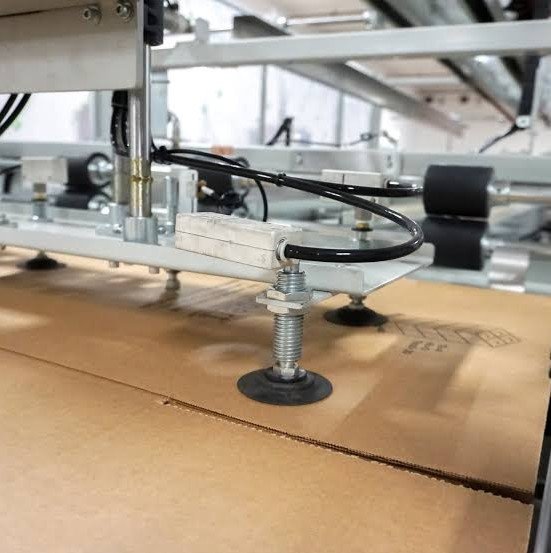
Why Preventive Maintenance Matters
Packaging equipment often operates for long periods under repetitive mechanical stress.
Belts continuously move cartons, rollers rotate thousands of times, and taping assemblies repeatedly contact adhesive materials. Over time, normal wear can gradually affect performance.
Preventive maintenance for Bestpack packaging systems can help:
- Reduce unexpected stoppages
- Improve sealing consistency
- Limit product damage
- Extend component life
- Reduce emergency repair costs
- Improve overall line reliability
The right maintenance interval depends on production volume, operating environment, and the specific machine model.
High-volume lines may require more frequent inspection than equipment used only occasionally.
Inspect Conveyor Belts Regularly
Conveyor and drive belts are critical because they control carton movement through the machine.
Worn or poorly tensioned belts may allow boxes to slip, twist, or move unevenly.
When maintaining Bestpack packaging systems, inspect belts for:
- Fraying
- Cracking
- Glazing
- Uneven wear
- Stretching
- Contamination
- Loss of grip
A belt may still appear functional while providing insufficient traction.
If cartons begin hesitating or drifting, belt condition should be checked before operators compensate by making unnecessary machine adjustments.
Keep Taping Components Clean
Adhesive residue can gradually build up around taping heads, rollers, guides, and cutting areas.
This buildup may interfere with tape tracking and cause inconsistent application.
Regular cleaning of Bestpack packaging systems can help reduce problems such as:
- Tape folding
- Poor adhesion
- Uneven application
- Adhesive buildup
- Tape jams
Cleaning methods should follow the manufacturer’s recommendations so rubber rollers, blades, and other surfaces are not damaged.
Using inappropriate solvents may create more problems than they solve.
Check Cutting Blades for Wear
Case sealers depend on sharp blades to cut tape cleanly.
A worn blade can stretch or tear the tape instead of producing a consistent cut.
Common signs of blade wear include:
- Ragged tape ends
- Incomplete cuts
- Tape remaining attached
- Increased adhesive buildup
- Repeated jams
When inspecting Bestpack packaging systems, blade condition should be included in routine maintenance.
Replacement should be performed carefully because the cutting components are extremely sharp.
Appropriate lockout procedures should be used before technicians work around moving or cutting assemblies.
Monitor Roller Condition
Rollers help guide cartons and tape through the packaging process.
Over time, rollers may become dirty, worn, damaged, or difficult to rotate.
Technicians should inspect rollers for:
- Flat spots
- Surface damage
- Adhesive contamination
- Uneven rotation
- Excessive play
- Bearing noise
A damaged roller can affect several Bestpack packaging systems functions at once.
For example, poor roller movement may cause carton misalignment, uneven tape placement, or additional belt wear.
Replacing worn rollers early may help prevent related components from failing prematurely.
Check Belt Tension and Alignment
Correct belt tension helps maintain reliable carton movement.
If tension is too low, belts may slip. If it is too high, bearings, shafts, and motors may experience unnecessary load.
Alignment matters as well.
Repeated belt drifting may indicate:
- Worn rollers
- Misaligned shafts
- Incorrect tension
- Damaged belts
- Loose mounting components
Maintenance teams working with Bestpack packaging systems should investigate the root cause rather than repeatedly adjusting the belt without further inspection.
Persistent alignment problems usually indicate another mechanical issue.
Keep Sensors Clean
Sensors may be used to detect cartons, control timing, monitor movement, or support automatic adjustments.
Dust, cardboard fibers, adhesive residue, and vibration can interfere with sensor performance.
Sensors on Bestpack packaging systems should be checked to ensure they are:
- Clean
- Properly aligned
- Securely mounted
- Correctly wired
- Responding consistently
A dirty or misaligned sensor can sometimes create symptoms that look like a larger machine fault.
Routine cleaning can prevent unnecessary troubleshooting.
Listen for Unusual Machine Noise
Packaging machinery often gives early warning before a mechanical failure.
Operators should become familiar with normal machine sounds so they can recognize changes.
Warning signs may include:
- Grinding
- Squealing
- Clicking
- Rattling
- Excessive vibration
- Intermittent motor noise
If Bestpack packaging systems suddenly sound different, the issue should be investigated promptly.
Unusual noise may indicate bearing wear, loose hardware, belt problems, gearbox issues, or failing drive components.
Inspect Motors and Drive Components
Motors, gearboxes, chains, sprockets, and couplings all contribute to consistent machine movement.
A problem in the drive system may appear as inconsistent carton speed or sudden hesitation.
During maintenance of Bestpack packaging systems, inspect for:
- Motor overheating
- Loose chains
- Worn sprockets
- Abnormal gearbox noise
- Damaged couplings
- Excessive vibration
Drive-system problems should be corrected before they place additional stress on belts, rollers, or other components.
Use Correct Replacement Parts
Industrial machine components should be matched carefully.
Two parts may look nearly identical but have different materials, dimensions, ratings, or tolerances.
Before ordering replacements for Bestpack packaging systems, verify:
- Machine model
- Serial number
- Existing part number
- Dimensions
- Electrical requirements
- Material specifications
- Application
Machine manuals and parts drawings can help technicians avoid ordering incompatible components.
Accurate identification is particularly important for older machines that may have undergone previous modifications or repairs.
Keep Critical Spares in Inventory
Unexpected downtime often becomes longer when replacement components are not available.
Facilities should identify high-wear and long-lead-time components and decide which ones should remain in stock.
Common spare items may include:
- Belts
- Rollers
- Bearings
- Blades
- Springs
- Sensors
- Fuses
- Drive components
For heavily used Bestpack packaging systems, having critical spares available can significantly shorten repair time.
Inventory decisions should consider part cost, failure frequency, lead time, and the production impact of the machine.
Track Component Failures
Maintenance records can reveal recurring patterns that are easy to overlook.
For every repair, technicians should record:
- Date
- Machine hours
- Component replaced
- Failure symptoms
- Root cause
- Repair time
- Replacement cost
If the same component fails repeatedly in Bestpack packaging systems, the real problem may involve misalignment, improper tension, contamination, incorrect installation, or another worn component.
Tracking failure history can help maintenance teams move from repeated replacement to root-cause correction.
Train Operators to Spot Early Problems
Machine operators interact with packaging equipment more frequently than maintenance teams.
They may notice changes in performance before a technician is called.
Operators should be encouraged to report:
- Uneven carton movement
- Tape misalignment
- New noises
- Belt slipping
- Sensor faults
- Repeated jams
- Poor sealing
Early reporting can protect Bestpack packaging systems from unnecessary damage.
Operators should also understand which adjustments they are authorized to make and which issues require trained maintenance personnel.
Use Safe Maintenance Procedures
Case sealing machinery can contain moving belts, sharp blades, electrical systems, and pinch points.
Repairs should never be performed while equipment is operating unless a specific manufacturer-approved procedure allows it.
Before servicing Bestpack packaging systems, technicians should follow appropriate shutdown and lockout procedures.
Potential hazards may include:
- Moving conveyors
- Cutting blades
- Compression rollers
- Electrical components
- Pneumatic mechanisms
Safety procedures should always take priority over reducing repair time.
Conclusion
Reliable packaging equipment depends on routine inspection, clean components, correct belt adjustment, sharp cutting blades, functioning sensors, and properly maintained drive systems. Preventive maintenance helps reduce the chance that a small problem will develop into a major production interruption. Understanding how the parts of machines work together can also make troubleshooting more accurate, because a visible symptom may originate from a different component elsewhere in the system. Facilities operating Bestpack packaging systems can improve reliability by maintaining detailed service records, stocking critical spares, using correct replacement components, and training operators to recognize early warning signs. A proactive approach can help reduce downtime, extend equipment life, and support more consistent packaging output.
For a bigger-picture view of line speed, it helps to understand polyolefin shrink equipment.
Related Reading
For guidance on choosing workshop tools, see Rubber Abrasive Wheel: Benefits and How to Choose the Right One.