

Introduction
iTop VPN Review: in this guide we test the setup, speeds, security features, and free plan of this Windows VPN, and we close this iTop VPN Review with a clear verdict on who should use it.
In our current digital era, protecting online privacy is something we can no longer overlook. Whether you’re browsing websites, working remotely, shopping online, or connecting to public Wi-Fi, your personal data can be exposed to hackers, advertisers, and cybercriminals. That’s why using a reliable VPN has become essential for every internet user.
If you’re looking for a secure, beginner-friendly, and feature-rich VPN, iTop VPN is one of the best options available. Designed especially for Windows users, iTop VPN combines powerful security, fast speeds, and an easy-to-use interface that anyone can use without technical knowledge.
One of the biggest advantages of iTop VPN is that it also offers a free VPN plan, allowing users to experience its essential security features before upgrading to the premium version. Whether you need to secure your public Wi-Fi connection, hide your IP address, or browse privately, iTop VPN makes the process simple.
In this review and how-to guide, we’ll explain what a VPN is, why you need one, why iTop VPN stands out from other providers, how to install it, and whether the free VPN version is worth trying.
What Is a VPN & Why Do You Need It?
A VPN builds an encrypted, secure connection that bridges your device and the internet. Instead of connecting directly to websites, your internet traffic passes through a protected VPN server. This process hides your real IP address, encrypts your online activity, and makes it much harder for third parties to track your browsing.
Using a free VPN or premium VPN helps protect your personal information while using public Wi-Fi at airports, hotels, cafés, schools, or shopping malls. Without a VPN, your browsing activity can be monitored by hackers, advertisers, or even your internet service provider.
Some of the biggest benefits of using iTop VPN include:
- Hide your real IP address
- Encrypt your internet connection
- Protect sensitive personal data
- Browse safely on public Wi-Fi
- Reduce online tracking
- Improve online privacy
- Secure your browsing experience
Whether you’re a student, remote worker, traveler, gamer, or everyday internet user, iTop VPN provides an extra layer of security that helps keep your personal information private.
iTop VPN Review: Why Is It One of the Best Free VPNs?
Among the many VPN providers available today, iTop VPN has become increasingly popular because it offers an excellent balance between security, performance, and ease of use.
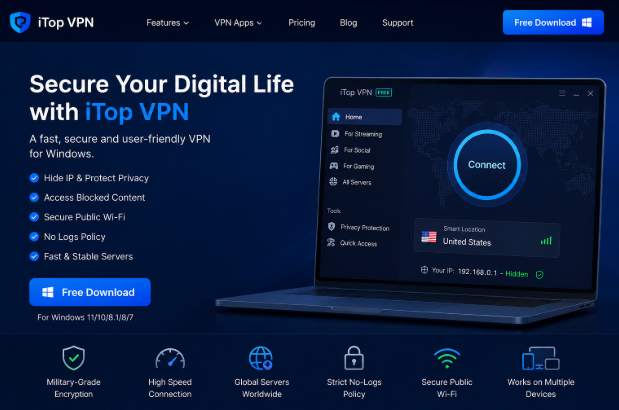
Unlike many complicated VPN applications, iTop VPN is designed with beginners in mind. Installation is simple, the interface is clean, and connecting to a VPN server takes only one click.
The software is especially suitable for Windows users who want strong protection without spending time learning complicated settings.
User-Friendly Interface
The dashboard is modern, simple, and easy to navigate. Even first-time users can understand how to connect within minutes.
Fast Connection Speeds
Unlike many free VPN services that slow down your browsing, iTop VPN provides stable performance for web browsing, streaming, downloading, and everyday internet use.
Strong Security
iTop VPN uses advanced encryption technology to protect your online activities from hackers and cyber threats.
Multiple Server Locations
Users can choose from various VPN servers depending on their browsing needs.
One-Click Connection
Simply open iTop VPN, choose a server, and click Connect. Everything else happens automatically.
Top Features of iTop VPN
One reason why many users choose iTop VPN is its impressive feature set.
Some of its key features include:
- Military-grade encryption
- One-click VPN connection
- Multiple global server locations
- Public Wi-Fi protection
- IP address masking
- DNS leak protection
- Fast browsing speeds
- User-friendly interface
- No complicated configuration
- Regular software updates
These features make iTop VPN suitable for beginners as well as experienced users looking for a reliable VPN solution.
Step-by-Step Guide to Set Up & Use iTop VPN
Setting up an iTop VPN is quick and easy.
Step 1: Download iTop VPN
Visit the official iTop VPN website and download the Windows version.
Step 2: Install the Application
Run the installer and follow the setup wizard. Installation usually takes only a few minutes.
Step 3: Launch iTop VPN
Open the application after installation. The clean interface makes navigation simple.
Step 4: Choose a Server
Select a VPN server that best matches your location or browsing needs.
Step 5: Connect
Click the Connect button.
Within seconds, iTop VPN encrypts your internet connection and hides your IP address.
Step 6: Browse Securely
Once connected, you can safely browse websites, access public Wi-Fi, and enjoy a more private online experience.
Is The iTop Free VPN Option Worthy Trying?
Yes.
One of the biggest reasons users choose iTop VPN is its free VPN version.
The iTop free VPN plan allows users to enjoy essential online protection without paying for a subscription. It is perfect for beginners who want to understand how VPN technology works before upgrading.
The iTop free VPN includes:
- Secure encrypted browsing
- Easy setup
- Beginner-friendly interface
- Basic online privacy protection
If you require additional servers, faster speeds, and advanced features, upgrading to the premium version is always an option.
For most casual users, the free VPN version of iTop provides an excellent starting point.
Pros and Cons
Pros
- Easy installation
- Beginner-friendly interface
- Fast connection speeds
- Strong encryption
- Multiple VPN servers
- Reliable privacy protection
- Free VPN available
- One-click connection
Cons
- Some advanced features require a premium subscription.
- Compared with the paid package, the free VPN only provides access to a small selection of servers.
Who Should Use iTop VPN?
iTop VPN works perfectly for all kinds of users.
Students
Students often use public Wi-Fi networks where additional security is important.
Remote Workers
Working from home requires secure internet access to protect business information.
Travelers
Hotels, airports, and cafés often provide unsecured public Wi-Fi. iTop VPN helps protect your personal information while traveling.
Gamers
Gamers can enjoy a secure connection while playing online games.
Everyday Users
Anyone who values online privacy can benefit from using iTop VPN every day.
Tips for Better Online Security
Although iTop VPN offers strong protection, following good cybersecurity habits provides even better security.
To stay safe online:
- Use strong, unique passwords.
- Enable two-factor authentication.
- Keep Windows updated.
- Avoid suspicious downloads.
- Install trusted antivirus software.
- Always use iTop VPN when connecting to public Wi-Fi.
- Never share sensitive information on unsecured websites.
Combining these habits with iTop VPN creates a much safer online experience.
Final Verdict
After reviewing its features, performance, and ease of use, it’s clear that iTop VPN is an excellent choice for anyone looking for a secure and easy-to-use VPN for Windows. Its clean interface, one-click connection, fast performance, and strong encryption make it ideal for beginners as well as experienced users.
The availability of a free VPN version is another major advantage, allowing users to test the software before upgrading to premium features. Whether you want to protect your privacy, secure public Wi-Fi connections, hide your IP address, or browse the web more safely, iTop VPN delivers a reliable solution.
If you’re searching for a trustworthy VPN with an excellent balance of security, performance, and simplicity, iTop VPN is definitely worth considering. Start with the free VPN version to experience its core features, and upgrade whenever you need additional servers, faster speeds, and more advanced protection.
VPN tools evolve alongside the wider security landscape, and Droven.io covers online privacy and security news.
Overall, this iTop VPN Review finds the app a sensible starting point for Windows users who want simple, free protection first. For background on how the technology itself works, read about the Virtual private network